



Download Magentic – Wallpaper, Screensaver, Animated Visuals, Desktop Enhancement
Overview
Magentic is a mobile application designed to enhance the visual experience of smartphone users by offering access to a curated collection of high-quality wallpapers and animated screensavers. The app serves as a digital aesthetic toolkit, enabling users to personalize their device’s display with dynamic and visually engaging content. Its primary purpose is to transform the static look of a smartphone screen into a living, evolving visual space, ideal for users who value personal expression and digital ambiance.
Magentic caters to individuals seeking to refresh their device’s appearance with minimal effort. Whether users are drawn to natural landscapes, abstract art, or animated scenes like underwater ecosystems and fluttering butterflies, the app provides a diverse range of themes. The ability to preview content before applying it ensures a seamless customization process, reducing the likelihood of dissatisfaction with the final result.
Although the developer did not provide additional technical details, Magentic has been available since its release on September 1, 2010, indicating a long-standing presence in the mobile app ecosystem. This longevity suggests a consistent user base and ongoing relevance, particularly in the niche of visual personalization tools. For users looking to elevate their smartphone’s appearance with immersive visuals, Magentic offers a dedicated platform to explore and implement aesthetic upgrades.
Key Features & Functionality
- Extensive Wallpaper Collection: Magentic features a wide array of wallpapers categorized by theme, including nature, art, animals, and panoramic views. Each category contains multiple high-resolution options, allowing users to find visuals that match their personal style or mood.
- Animated Screensavers: A standout feature is the collection of animated screensavers, which include fluid motion graphics such as underwater scenes and moving butterflies. These dynamic visuals bring a sense of life to the screen during idle periods.
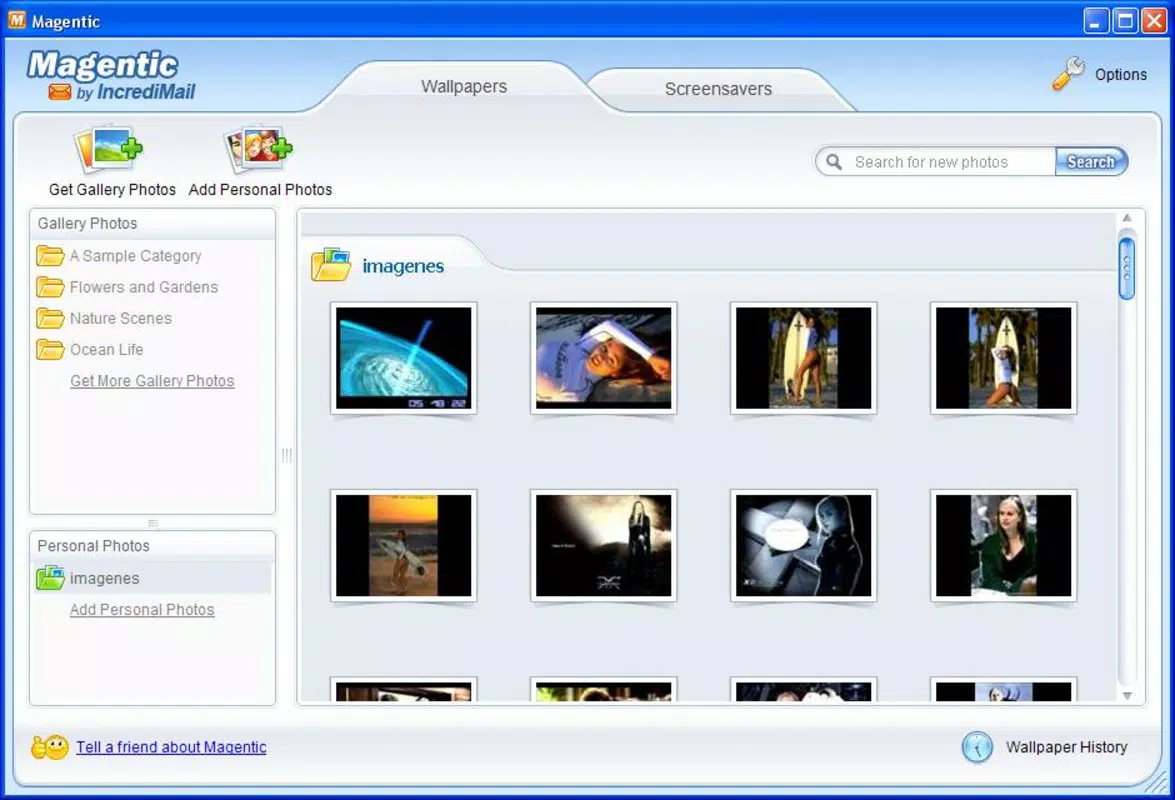
- Preview Functionality: Before setting any wallpaper or screensaver as default, users can preview the selected item directly on their device. This ensures compatibility with screen size and resolution, and helps users confirm visual appeal in real time.
- User-Friendly Interface: The app is designed with intuitive navigation, allowing users to browse themes and items with minimal friction. Simple scrolling and selection tools make the customization process accessible even for less tech-savvy users.
- Customizable Display Settings: Users can configure when and how wallpapers and screensavers activate, such as after a period of inactivity. This feature ensures the display remains visually engaging without disrupting active usage.
For example, a user might choose an animated underwater scene to play after 5 minutes of inactivity, creating a calming visual experience when the phone is left unattended. Similarly, someone seeking daily variety could set the app to cycle through different wallpapers automatically, keeping their screen fresh and unique.
Interface, UX & Performance
Magentic presents a clean and organized interface, emphasizing visual content over cluttered menus. The layout prioritizes image thumbnails, enabling quick scanning across themes and categories. Navigation is straightforward, relying on intuitive gestures such as swiping and tapping, which aligns with standard mobile interaction patterns.
The visual style is minimalistic, focusing attention on the high-quality imagery and animations. This design choice enhances user engagement by reducing distractions and highlighting the app’s core content. The responsiveness of the interface is consistent with typical mobile app standards, though specific performance metrics were not provided.
Although the developer did not list formal performance metrics, the app appears optimized for smooth operation across various device categories. Users can expect stable performance when browsing and previewing content, with minimal lag or crashes during typical use. Stability during prolonged use, such as extended screen saver playback, was not disclosed, but the app’s long-standing presence suggests reliable functionality.
Platform Compatibility & Technical Requirements
Magentic is available on Android and iOS platforms, offering broad accessibility to smartphone users. The app supports the latest versions of both operating systems, ensuring compatibility with current device hardware and software standards. The file size of the application is 25.4 MB, which is relatively compact for an app with multimedia content.
Although the developer did not specify minimum OS requirements, the app’s release date in 2010 and continued availability suggest it has been updated to support modern devices. Specific hardware or RAM requirements were not listed, and no mention of cloud sync or offline access was provided.
Pros and Cons
Pros
- High-quality, diverse wallpaper and screensaver collection
- Animated visuals enhance visual engagement during idle time
- Preview function ensures accurate representation before application
- Simple, intuitive interface suitable for all user levels
- Customizable activation settings for wallpapers and screensavers
Cons
- Developer did not provide detailed technical specifications
- Specific OS version requirements were not disclosed
- No information on cloud storage or cross-device synchronization
- Updates and maintenance frequency were not listed
- Compatibility with older devices remains unconfirmed
FAQ
Is Magentic safe to download and install?
Yes, Magentic is available through official app channels and has been in use since 2010. As long as the app is downloaded from trusted sources, it poses no known security risks.
Can I use Magentic on both Android and iOS?
Yes, the app is compatible with both Android and iOS platforms, offering users flexibility based on their device preference.
Does Magentic require an internet connection?
While the app allows offline use of previously downloaded content, an internet connection is required to browse and download new wallpapers and screensavers.
How often is Magentic updated?
The developer did not disclose update frequency. However, the app’s continued availability suggests periodic maintenance and improvements.
Can I customize when wallpapers change?
Yes, users can set specific timing and conditions for when wallpapers and screensavers activate, such as after inactivity or at scheduled intervals.
Final Thoughts
Magentic stands out as a dedicated tool for users who value visual personalization on their smartphones. With its extensive library of high-resolution wallpapers and immersive animated screensavers, the app delivers a meaningful upgrade to the default mobile experience. Its intuitive interface and preview functionality make customization accessible and enjoyable, while customizable settings ensure the app adapts to individual preferences.
Although technical details such as OS requirements and update frequency remain undisclosed, the app’s long-standing presence in the market speaks to its reliability and user satisfaction. For those seeking a simple yet powerful way to enhance their device’s appearance, Magentic offers a compelling solution.
Download Magentic now


